Virtual Staging AI Alternative: HomeGlow Compared
HomeGlow is a newer AI room redesign tool for the web and Telegram, free to try, with PRO at $11.99 per week or $79.99 per year; Virtual Staging AI is a specialist staging tool for agents, priced per photo per month. This page compares prices and features as of 26 October 2026 and states where each tool is stronger.
Prices and features checked 26 October 2026
Last updated 26 October 2026
Who should pick which.
Virtual Staging AI is a virtual staging service for real estate with plans sized by photos per month.
| If you need | Pick | Why |
|---|---|---|
| Stage many listings a month | Virtual Staging AI | Its per-photo price drops as volume rises, down to $0.53. |
| Stage one room, occasionally | HomeGlow | HomeGlow has a free way to try and a single PRO plan. |
| Watermark-free staging on every plan | Virtual Staging AI | Its plans list no watermark. HomeGlow's free results are watermarked. |
| An API | Virtual Staging AI | It lists API access on Enterprise. |
| Also restyle rooms, repaint walls or change floors | HomeGlow | Those are separate tools in HomeGlow, beyond staging. |
What Virtual Staging AI lists.
Only what the vendor’s own page states, each with its source. Prices and features checked 26 October 2026.
| Item | Listed | Source |
|---|---|---|
| Basic | 6 photos a month for $16 ($2.67 a photo). | virtualstagingai.app/pricing |
| Standard | 20 photos a month for $19 ($0.95 a photo). | virtualstagingai.app/pricing |
| Professional | 60 photos a month for $39 ($0.65 a photo). | virtualstagingai.app/pricing |
| Enterprise | 150 photos a month for $79 ($0.53 a photo). | virtualstagingai.app/pricing |
| Yearly billing | Twelve times the monthly price. | virtualstagingai.app/pricing |
| Every plan | Unlimited renders and downloads of your photos, furniture removal, no watermark and, it says, about 10 seconds' turnaround. | virtualstagingai.app/pricing |
| Free plan | None listed on its pricing page. | virtualstagingai.app/pricing |
| API | On Enterprise only. | virtualstagingai.app/pricing |
Side by side.
Rows appear only where both sides are stated. Prices and features checked 26 October 2026.
| Feature | HomeGlow | Virtual Staging AI | Source |
|---|---|---|---|
| Free access | 1 free watermarked generation (one-time); no card needed to start | No free plan listed | virtualstagingai.app/pricing |
| Pricing model | PRO is $11.99 a week or $79.99 a year | From $16 a month for 6 photos, to $79 for 150 | virtualstagingai.app/pricing |
| Watermark | On free results; removed on PRO | None on any plan | virtualstagingai.app/pricing |
| Furniture removal | Yes (Declutter and Cleanup tools) | Included | virtualstagingai.app/pricing |
For an agent staging many photos each month, its per-photo price is lower than a general tool can match. HomeGlow's plans are not priced per photo, so this page does not claim a price advantage.
Prices and features checked 26 October 2026. Vendors change plans often; confirm on their own pages before you decide.
Where each is stronger.
Where HomeGlow is stronger
- Staging sits beside restyling, wall colours, floors and declutter in one tool.
- You can try it free before paying.
- Photos are stored privately.
Where Virtual Staging AI is stronger
- Built for volume staging, with a lower price per photo at higher tiers.
- No watermark on any plan, and unlimited renders of each photo.
- An API on its top plan.
Where HomeGlow falls short
- HomeGlow is new and small. There is no long track record or large body of independent reviews.
- There is no iPhone app yet (one is in preparation) and no Android app. HomeGlow runs in a web browser and as a Telegram Mini App.
- The free tier is 1 free watermarked generation, and Colorways and refining a result are PRO features.
- It does not link to real products, estimate costs or export CAD or 3D model files.
- HD upscale is available on PRO only, and there is no video.
- Free staging results are watermarked, so use them to evaluate rather than to list a property.
What HomeGlow does on a real room.
A real HomeGlow render. We only show our own output here, not Virtual Staging AI’s.
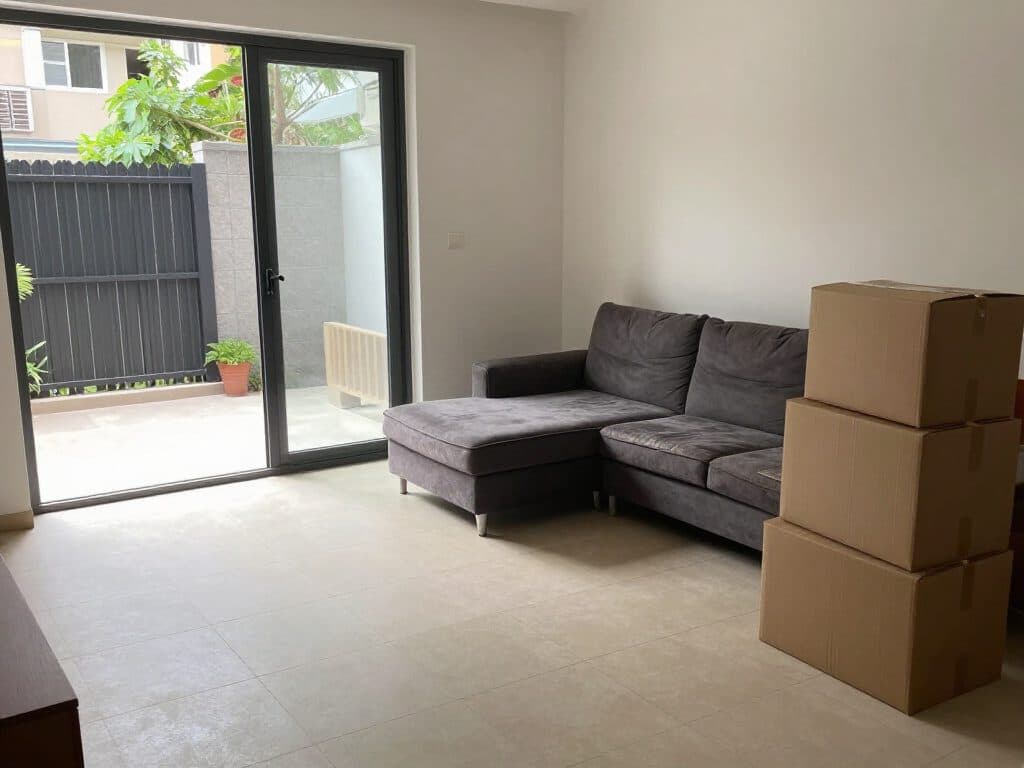
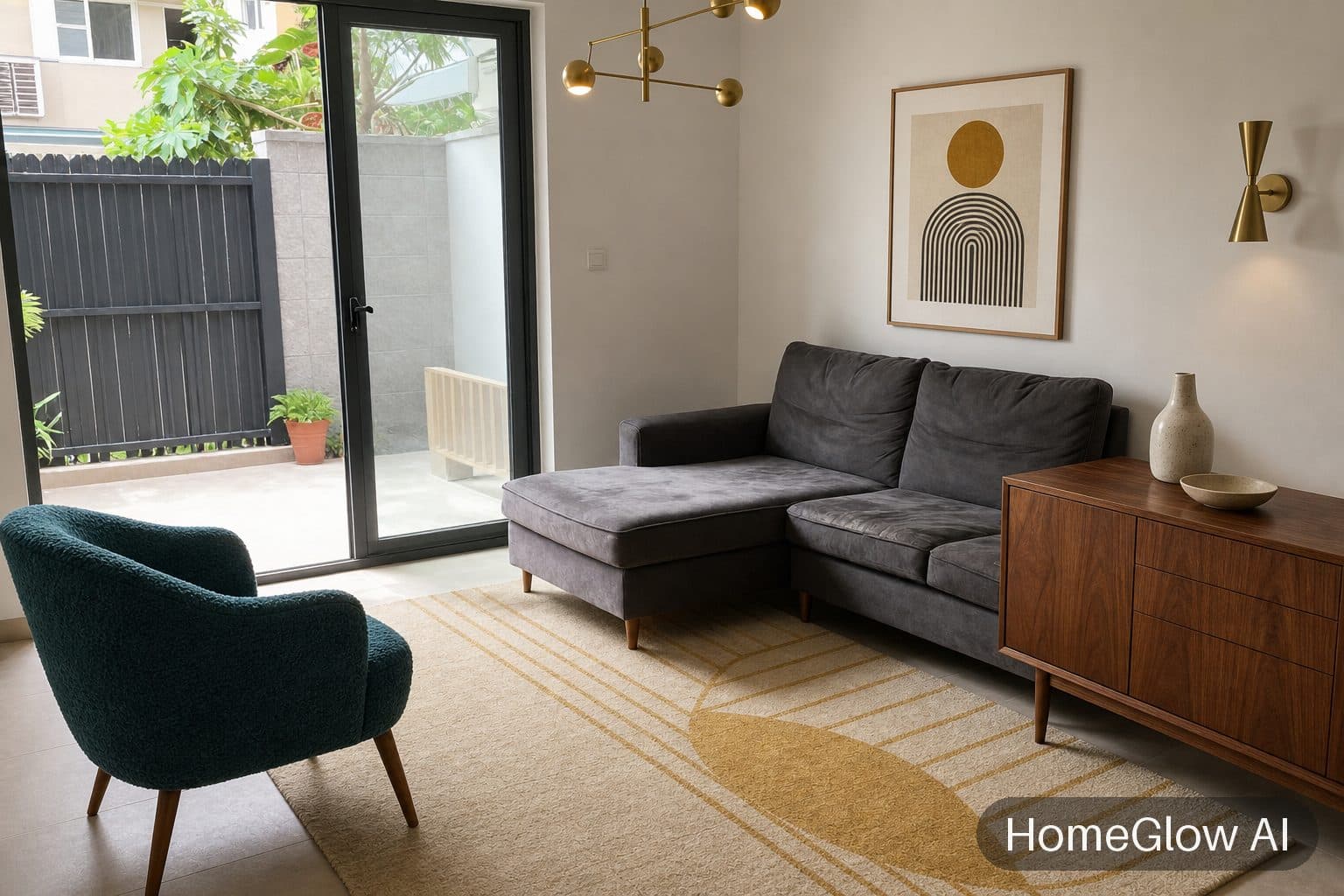
Living room, mid-century. Same sofa, same glass doors; the boxes are gone and the room is furnished. See this design
Questions.
What is the cheapest virtual staging?
For volume, per-photo pricing on a specialist plan is hard to beat; Virtual Staging AI lists $0.53 a photo on Enterprise. For one room, a free-to-try tool may be enough.
Does Virtual Staging AI have a free plan?
Its pricing page lists four paid plans and no free plan. HomeGlow is free to try: 1 free watermarked generation, one-time.
Is AI staging accepted on MLS?
Rules vary by MLS and region. Check yours, and disclose virtual staging; that is good practice either way.
Best virtual staging for one listing?
If it is one listing, compare the monthly cost against what you need. HomeGlow's free tier lets you test before paying.
Can I try staging free?
Yes. HomeGlow's Furnish empty room tool is free to try: 1 free watermarked generation, one-time.
Other comparisons.
HomeGlow tools in detail: AI interior design. Plans are on the pricing page.
Judge it on your own room.
Free to try on a photo of your room. No card needed to start.
Try staging a room free